- Bloch Sphere
- Run it
- Reading the sphere
- What it cannot show
- Credits and links
Bloch Sphere
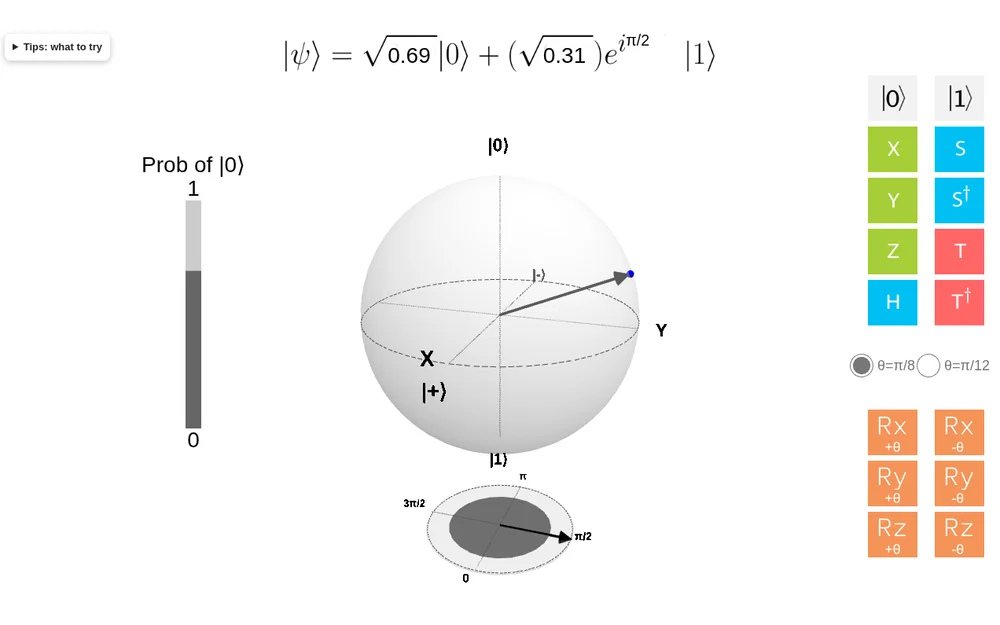
An interactive Bloch sphere in your browser: click a gate, watch the qubit move. It is the quickest way to build intuition for what quantum gates actually do to a single qubit.
Needs: network on first start · Start it with: rq_demo_run.sh grok-bloch
Run it
Double-click the Grokking the Bloch Sphere icon on the desktop, and it opens in your browser. After its first download this version works offline and has tips on what to try and a short explanation.
It is also under Applications → RasQberry → Grokking the Bloch Sphere, or in
sudo raspi-config → 0 RasQberry → Quantum Demos → Learn & code, which also offers the
online version.
Reading the sphere
Every pure state of one qubit is a point on the sphere:
- North pole — |0⟩, south pole — |1⟩
- Equator — superpositions with an equal chance of either
- X axis — |+⟩ and |−⟩ (the Hadamard basis)
- Y axis — |+i⟩ and |−i⟩ (the circular basis)
The state equation is shown at the top, and the probability of measuring |0⟩ alongside it. Click gates and watch the vector swing: X, Y and Z turn the state half a revolution about their axis, H takes the poles to the equator (|0⟩ → (|0⟩ + |1⟩)/√2), and Rx/Ry/Rz rotate by an angle you choose (θ = π/8 or π/12).
Start with X, Z and H before the rotation gates — the effect is easier to see. Then try reaching a state you pick in advance.
What it cannot show
Worth knowing, because it is the honest limit of the picture:
- One qubit only. There is no Bloch sphere for two entangled qubits — the whole point of entanglement is that neither qubit has a state of its own.
- Pure states only. No mixed states, so no decoherence or noise.
Credits and links
Built by James Weaver (JavaFXpert) — JavaFXpert/grok-bloch.
- IBM Quantum Learning: single-qubit gates
- IBM Quantum Composer — build circuits with a Bloch sphere beside them
- Bloch sphere on Wikipedia
See the Demo List for everything else on the image.
Questions? Ask Ket.