- Bill of Materials
- Contributors
- Guiding Principles
- Required Components
- Core Components:
- Raspberry Pi:
- LED Panel:
- Enclosure:
- Miscellaneous:
- 3D Model Files:
- Optional (Nice to Have) Components:
- Bill of Materials
- Core Components BOM
- Optional Components BOM
Bill of Materials
This document contains all the information you need to purchase everything needed to assemble the RasQberry Two Platform. When fully assembled, you will have a functional and detailed model like this one!
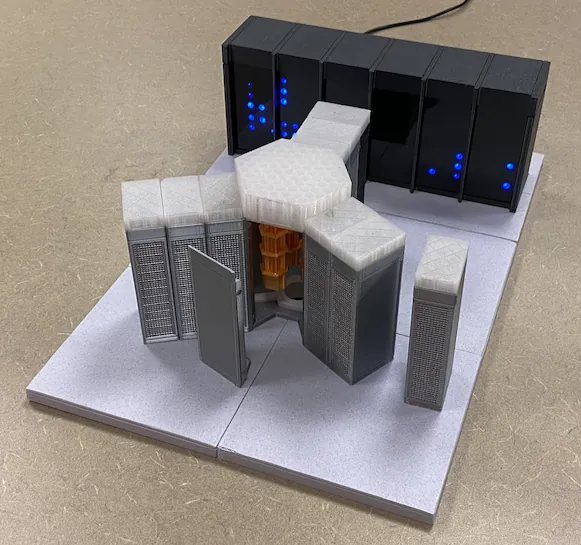
No printed model yet? Explore it in 3D in the assembly guide.
The Required Components section provides a handy list of every component needed for the basic model as well as any optional additions.
The Bill of Materials section organises every component into an easy to read table with accompanying important information such as cost, quantity and purchase links.
Contributors
The following people have contributed to the development of the documentation:
Luka Dojcinovic, Andy Stanford-Clark, Eric H Jenney, Jan-Rainer Lahmann, Sascha Schefenacker
You can contact any of us with questions, concerns or suggestions for changes to the hardware specs and the assembly guide.
Guiding Principles
These are the key tenets that we strive to follow when designing and assembling the hardware of the RasQberry Two.
-
The RasQberry Two platform will be an Open Platform that anyone can access and anyone can contribute to. All code provided, along with the 3D models and the hardware assembly procedure, will be open source.
-
Two tiers of the project will be provided; Core and Optional. The Core tier will be all the necessary components needed to create the base RasQberry Two model, with an emphasis on making it as cost effective and easy to procure as possible. The Optional tier will include optional components that enhance the functionality of the model if the user would like to expand on the Core tier.
-
The RasQberry Two should be easy to procure; the components should be readily available and different store page links should be provided for people around the world.
-
The RasQberry Two should be easy to assemble; someone with little to no prior hardware experience should be able to assemble it by following the instructions.
-
There should be no soldering required to assemble the RasQberry Two.
-
When possible, the RasQberry Two should faithfully recreate the real world quantum computer it is based on.
-
The RasQberry Two should serve as a fun and creative way to educate about quantum computers and how they work.
Required Components
Core Components:
The following core components are necessary to create the base functioning model of the RasQberry Two. It includes all the components needed for the enclosure model, the LEDs and the operation of the Raspberry Pi at the heart of this project.
Raspberry Pi:
-
Raspberry Pi 5 2GB or Raspberry Pi 4B 4GB
- 2 GB of RAM for the Pi 5 is enough for most demos. For the Workshop & Qiskit Server with a group, take 4 GB or more: up to about 2 participants can run code at the same time on 2 GB, 8 on 4 GB and 15 on 8 GB.
- The Pi 5 is recommended for this project, however a Pi 4B can be used as well. It needs the official 15W USB-C power supply and its own cooling: the cooling configuration with a Pi 4B has not been tested, so a PWM fan mounted above the CPU is recommended. The LED panel is wired the same way (GPIO 18).
-
The hardware assembly guide will assume that a Raspberry Pi 5 is used.
-
Raspberry Pi 5 27W USB-C Power Supply (5.1V, 5A; for a Pi 4 the official 15W USB-C supply)
-
Raspberry Pi 5 Active Cooler
-
MicroSD card: 128 GB high-speed (A2, U3) recommended. Minimum 16 GB without the Docker demos, 32 GB with them, 64 GB for two systems with safe updates (the A/B image), 128 GB for two systems with all Docker demos
-
Right Angle USB-C Adapter
-
Right Angle HDMI adapter (Make sure right direction)
LED Panel:
-
WS2812IC 4×12 LED Panel (4 of them), or one 8×32 panel cut to 8×24 (recommended, see Jan's corner)
-
Male to Female Breadboard Jumper Wires
-
Filter screen for LEDs
Enclosure:
-
An FDM 3D Printer or access to one
-
PLA Filament
Note: Multiple colours of PLA are needed to achieve the desired look. The specific colours and total amounts of PLA have been listed in the BOM below.
Miscellaneous:
-
Magnets
-
Nuts and Bolts
-
Screws
3D Model Files:
The 3D Model STL files for the RasQberry Two Platform can be found here. The RasQberry Two's Model is divided into the following sections: The Wall, The Floor, The Cryostat and the RTEs. The filament colours and the amount needed for each section of the model can be found in the table below, in the row labeled: 3D Printer Filament.
Optional (Nice to Have) Components:
The following components are optional. They are not required for the core functions of the RasQberry Two, but they can enhance the experience and provide features such as portability and extra illumination.
-
Geekworm X1203 UPS (Uninterruptible Power Supply)
-
Battery pack holder
-
18650 Batteries (2 of them)
-
USB-C Power Switch
-
LED Ring for Cryo-illumination
Bill of Materials
Core Components BOM
Note: The prices listed are accurate as of December 12, 2024.
| Part Name | Part Description | Part # | North America Links | EU Links | Asia Links | Quantity Needed | Unit Cost | Total Cost |
|---|---|---|---|---|---|---|---|---|
| Raspberry Pi 5 2GB | The brains of the whole operation. | Note: You can get the 4GB or 8GB model for better performance on certain demos and to be more future proof if desired. | Amazon Link PiShop.us Link | Amazon EU | 1 | US $50.00 | US $69.99 (Amazon) US $50.00 (PiShop) | |
| Power Supply | Power Supply for Raspberry Pi 5. | Raspberry Pi 27W USB-C Power Supply Black US Note: Use the official supply. Ordinary USB-C chargers give a Pi 5 only 3A at 5V, too little with a bright LED panel. | Amazon Link PiShop.us Link | Amazon EU | 1 | US $13.60 | US $13.00 (Amazon) US $13.60(PiShop) | |
| Active Cooler | Fan to cool the Pi 5. | Raspberry Pi Active Cooler | Amazon Link PiShop.us Link Canakit.com Link Link to 5V fan | Amazon EU | 1 | US $9.12 (Amazon) US $6.45 (PiShop) | US $9.12 (Amazon) US $6.45 (PiShop) | |
| SD Card | SD Cards for the Raspberry Pi 5 storage. | 128 GB A2/U3 card recommended, 16 GB minimum (card sizes). Recommended: official Raspberry Pi SD Card 128 GB (A2, U3, V30) | Raspberry Pi SD Cards (Approved Resellers) | Raspberry Pi SD Cards | 1 (a second card is handy as a backup) | see reseller | see reseller | |
| Right-angle Power Adapter | Right angle adapter for the USB-C power supply. | Amazon Link ThePiHut.com | Amazon EU | 1 | US $6.30 | US $12.60 for 2 (Amazon) | ||
| Micro HDMI to HDMI Adapter Cable | Cable to convert the Pi's Micro HDMI port into the more common HDMI port. To be used when connecting the Pi to a display. | Amazon Link (Right angle can be used while in the enclosure) PiShop.us Link | 1 | US $9.99 (Amazon) US $2.95 (PiShop) | US $9.99 (Amazon) US $2.95 (PiShop) | |||
| LED Panels | 4x12 Pixels LED Panels to display images on the wall. | WS2812IC SMD 5050 RGB Module Matrix Screen DC5V | AliExpress Link | AliExpress Link | 4 | US $3.36 per panel. | US $13.44 (AliExpress) | |
| LED Panel (alternative) | One flexible 8x32 WS2812B panel, cut to 8x24 (192 LEDs): no wiring between panels and no seams. Recommended in Jan's corner. | WS2812B 8x32 flexible LED matrix, DC5V | Amazon Link | 1, instead of the four 4x12 panels | ||||
| Breadboard Jumper Wires | Male to Female 20cm Jumper Wires to connect the Pi to the LEDs. | Amazon Link PiShop.us Link | Amazon EU | 1 (40 Wires) | US $2.95 | US $7.99 (Amazon) US $2.95 (PiShop) | ||
| LED Filter Screen | Welding Shield to place in front of the LED Panels. | AliExpress Link | Amazon EU | AliExpress Link | 1 | US $2.99 (with Free Shipping) | US $2.99 (AliExpress) US $12.62 (Amazon) | |
| 3D Printer Filament | Filament needed to print the enclosure and quantum computer model. | Silk Silver (Cryo, RTE) - Transparent (Lids) - Black (Wall) - White/Rock White (Floor) - Silk Gold (Chandelier) - Note: Matte Black PLA filamenet is preferable. | Amazon Link (Silk Silver) Amazon Link (Transparent) Amazon Link (Black) Amazon Link (White/Rock White) Amazon Link (Silk Gold) | Amazon EU (Silk Silver) Amazon EU (Transparent) Amazon EU (Black) | 204g (Silk Silver) 82g (Transparent) 205g (Black) 282g (Rock White) 24g (Silk Gold) | Varies | The price per spool varies based on colour and manufacturer. Prices average between US $14 - $22 per spool. | |
| Magnets | Magnets to connect enclosure model (door, RFE). | 15x2mm and 3x2mm Neodymium Disc Magnets. | umagnets.com (15x2mm) umagnets.com (3x2mm) | Amazon EU (15x2mm) Amazon EU (3x2mm) | 12 (15x2mm Magnets) 14 (3x2mm Magnets) | US $0.30 per magnet US $0.04 per magnet | US $2.99 for 10 (umagnets) US $1.99 for 50 (umagnets) | |
| Bolts and Nuts | Bolts and nuts to secure the floor tiles together. | #4-40 3/8 in. Round-Head Screws (US). Note: M3 Bolts with A2 Hex Heads can be used for metric screws. | Home Depot Link (Your local hardware store will probably carry similar ones.) | 14 | US $1.98 per 10 screws | US $3.96 (Home Depot) | ||
| Screws | Screws used to secure the Pi to the back plate of the Wall. | #4 x 3/8-inch Square Drive Tapping Screw (US). For metric, any M2.5 screw that is between 6mm - 8mm in length will do. Note: You can also use #4-40 x 1/4-inch Machine Screws as an alternative. These ones are a better fit, but they are not pointed at the end so you will have to create the thread within the plastic yourself. | Home Depot Link Home Depot Link (Alternative Screw) Home Depot US Link | 4 | US $1.50 per 16 screws | US $1.50 (Home Depot) |
Shopping Tip: In most cases, it is cheaper to buy all of the Raspberry Pi components from PiShop instead of Amazon. The following components can all be purchased with one order from PiShop for a total of US $85.90:
- Raspberry Pi 5 2GB
- Power Supply
- Active Cooler
- SD Card
- Micro HDMI to HDMI Adapter
- Breadboard Wires
Optional Components BOM
Note: The prices listed are accurate as of December 12, 2024.
| Part Name | Part Description | Part # | North America Links | EU Links | Asia Links | Quantity Needed | Unit Cost | Total Cost |
|---|---|---|---|---|---|---|---|---|
| UPS | UPS to power the Pi so that it can be disconnected from power and shown around for a short time. | Geekworm X1203 | Geekworm Link | Amazon EU | 1 | US $41.00 | US $41.00 (Geekworm) | |
| 2x 18650 Battery pack | Battery pack holder for the UPS. | 2 Pack 2-way parallel 18650 battery pack with XH2.54 terminals head | Geekworm Link | 1 | US $4.00 | US $4.00 (Geekworm) | ||
| 18650 Batteries | Batteries to power the UPS. | Any 18650 Battery. NOTE: Do not buy Li-Ion batteries from Amazon! It is against Amazon TOS and they will be poor quality. Good brands include Samsung, Molicel or Panasonic. | LION Wholesale 18650BatteryStore | 2 | US $6.20 (LION Wholesale) US $4.65 (18650 Battery Store) | US $12.40 (LION Wholesale) US $9.30 (18650 Battery Store) | ||
| LED Ring | This ring can be placed inside the main model to have extra illumination. (may need additional Breadboard Jumper Wires). | 5V RGB LED Ring WS2812B 12-Bit 38mm | Amazon Link | Amazon EU | 1 | US $6.99 EU 6€ | US $6.99 (Amazon) EU 6€ | |
| Power Switch | Switch to power on the Pi from outside of the case. | NOTE: For the Pi 5, an inline switch is needed. | PiShop.us Link | Amazon EU | 1 | US $4.95 | US $4.95 (PiShop) | |
| Weights | Adgesive weights that can be placed inside the cryostat and the RTEs to make them feel heavier and more hefty. | Amazon Link | Amazon EU | 6 weights for each RTE (48 per package = 8 RTEs) | US $0.20 per weight | US $8.20 (Amazon) |