- Quantum Fractals
- Run it
- How it works
- What you'll see
- Credits and links
Quantum Fractals
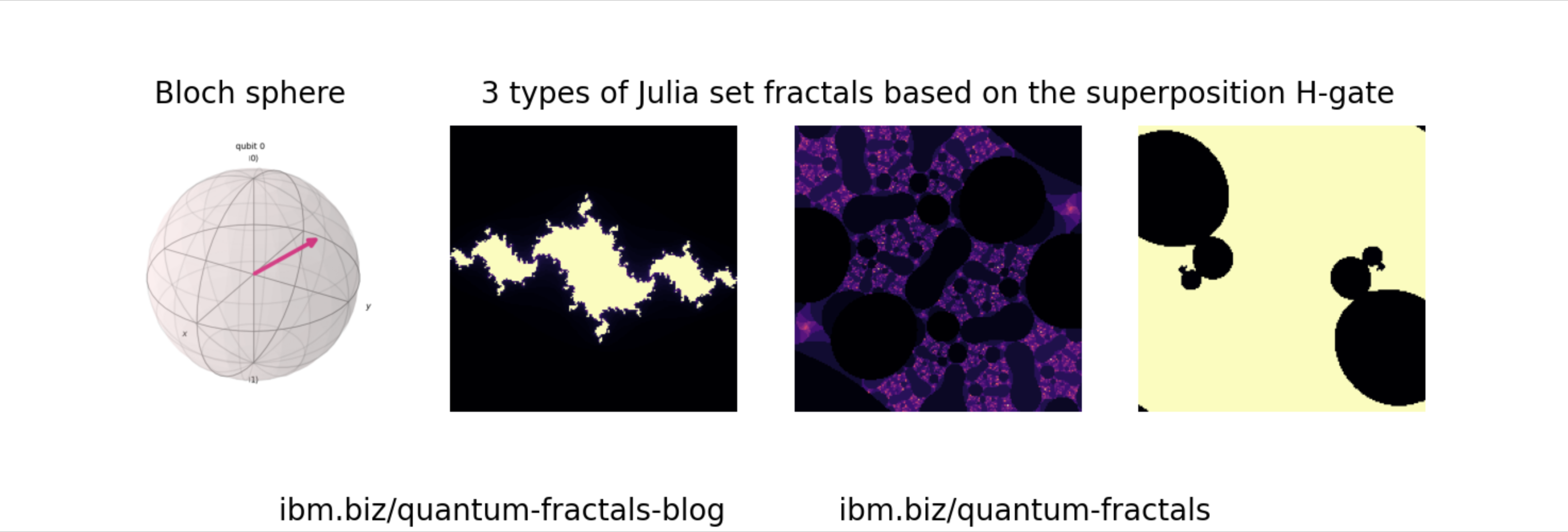
A quantum circuit produces a complex number; that number draws a Julia set. Step the circuit through a rotation and the fractal moves with it — so an abstract quantum state becomes something you can watch change.
Needs: a display · Start it with: rq_demo_run.sh quantum-fractals
Run it
Open the Play folder on the desktop and double-click Quantum Fractals; it starts generating straight away and opens the result in your browser.
It is also under Applications → RasQberry → Quantum Fractals, or in
sudo raspi-config → 0 RasQberry → Quantum Demos → Play.
How it works
A Julia set is defined by repeating one line:
z(n+1) = z(n)² + c
Change the complex constant c and you get a completely different shape. This
demo takes c from a quantum state — the amplitudes of a one-qubit circuit
are complex numbers, so they can be fed straight in.
Each frame advances the circuit a little, giving a new c and a new fractal. Run
60 of them together and the fractal appears to flow, tracing the qubit's path
around the Bloch sphere. Each frame shows the circuit that made it alongside its
fractals, and the finished animation is saved as a GIF.
Everything runs on the local simulator — no IBM Quantum account, no network.
What you'll see
Frames appear one by one in the browser (the Pi computes each one), then an
animated GIF of the whole sequence. Images are written to
/tmp/rasqberry-fractals-img/.
A full 60-frame run takes a while on a Pi. If you want it quicker, the constants
at the top of fractals.py are the ones to change:
| Setting | Default | Does |
|---|---|---|
frame_resolution | 200 | image size, in pixels square |
number_of_frames | 60 | how long the animation is |
GIF_ms_intervals | 200 | ms per frame (200 = 5 fps) |
julia_iterations | 100 | fractal detail |
zoom | 1.0 | how far in |
Credits and links
Created by Wiktor Mazin and team; ported to RasQberry by Jan-R. Lahmann.
- Visualizing Quantum Computing using Fractals — the original
- Creating Fractal Art with Qiskit
- Fractal Animations with Quantum Computing on a Raspberry Pi
- Julia sets on Wikipedia
See the Demo List for everything else on the image.