- Bloch Sphere
- Run it
- Reading the sphere
- What it cannot show
- Credits and links
Bloch Sphere
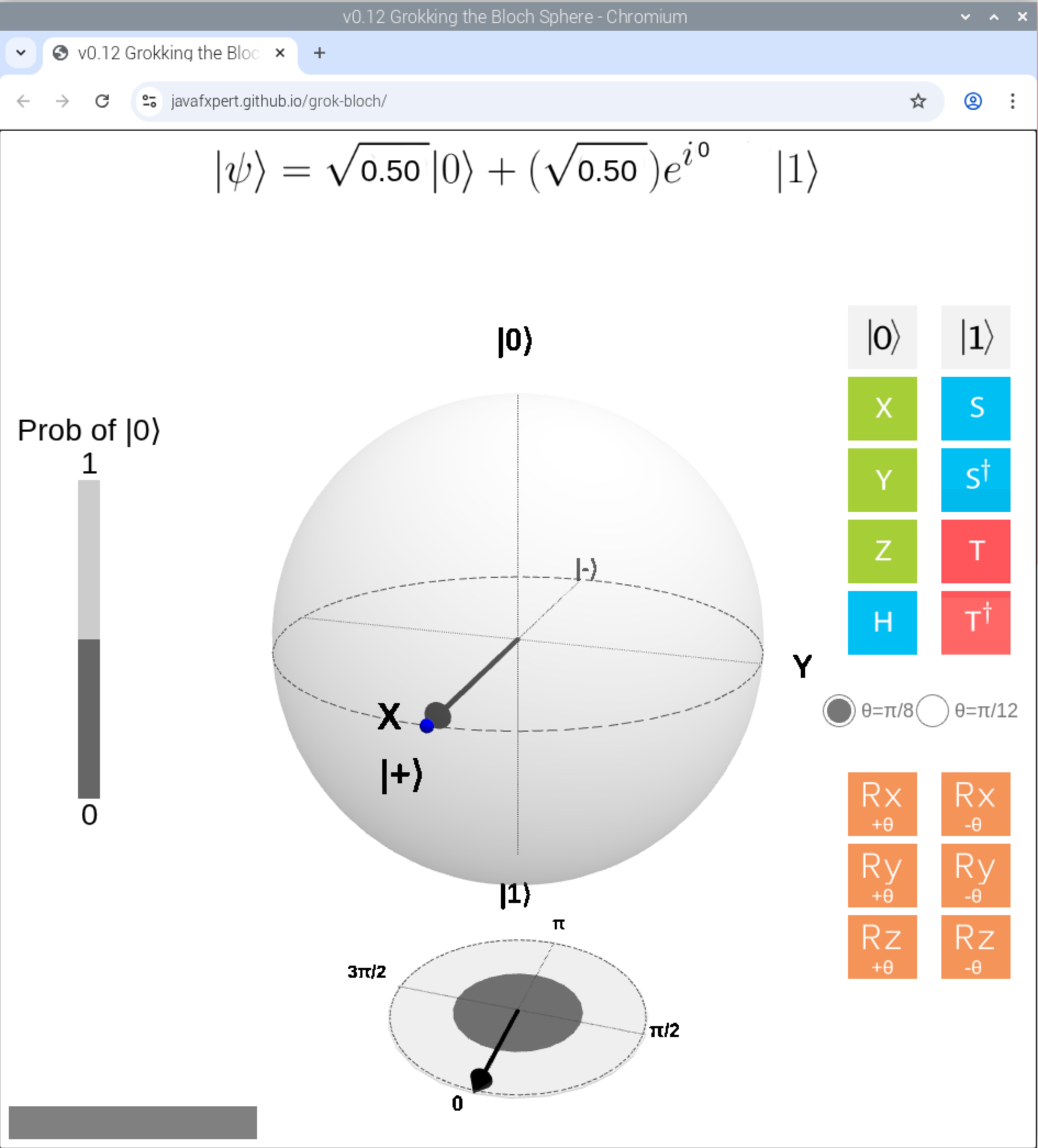
An interactive Bloch sphere in your browser: click a gate, watch the qubit move. It is the quickest way to build intuition for what quantum gates actually do to a single qubit.
Needs: a display · Start it with: rq_demo_run.sh grok-bloch
Run it
Double-click the Grokking the Bloch Sphere icon on the desktop, and it opens in your browser. This version works offline and has tips on what to try and a short explanation.
It is also under Applications → RasQberry → Grokking the Bloch Sphere, or in
sudo raspi-config → 0 RasQberry → Quantum Demos → Learn & code, which also offers the
online version.
Reading the sphere
Every pure state of one qubit is a point on the sphere:
- North pole — |0⟩, south pole — |1⟩
- Equator — superpositions with an equal chance of either
- X axis — |+⟩ and |−⟩ (the Hadamard basis)
- Y axis — |+i⟩ and |−i⟩ (the circular basis)
The state equation is shown at the top, and the probability of measuring |0⟩ alongside it. Click gates and watch the vector swing: X, Y and Z turn the state half a revolution about their axis, H takes the poles to the equator (|0⟩ → (|0⟩ + |1⟩)/√2), and Rx/Ry/Rz rotate by an angle you choose (θ = π/8 or π/12).
Start with X, Z and H before the rotation gates — the effect is easier to see. Then try reaching a state you pick in advance.
What it cannot show
Worth knowing, because it is the honest limit of the picture:
- One qubit only. There is no Bloch sphere for two entangled qubits — the whole point of entanglement is that neither qubit has a state of its own.
- Pure states only. No mixed states, so no decoherence or noise.
Credits and links
Built by James Weaver (JavaFXpert) — JavaFXpert/grok-bloch.
- IBM Quantum Learning: single-qubit gates
- IBM Quantum Composer — build circuits with a Bloch sphere beside them
- Bloch sphere on Wikipedia
See the Demo List for everything else on the image.